“Did you see my message?”
Someone asked in Slack at 4:12. Twelve people reacted. Nobody owns it. By Friday it is three threads down and everyone thinks someone else is on it.
ProcessPath is the simple internal ticketing system. Assign, route, and track tasks - no training, no complicated project tools.
No credit card needed · 2 minute setup
Messages aren't tracked. That's why they keep disappearing.
Someone asked in Slack at 4:12. Twelve people reacted. Nobody owns it. By Friday it is three threads down and everyone thinks someone else is on it.
The real ask was buried under a FYI and a forwarded chain. The person who needed to act never saw it, or it simply didn't register it as work assigned to them.
Two people, one client request, zero owner. Chat is great for talking. It is a terrible system of record.
ProcessPath is a lightweight internal task management system built on tickets. Work owed to you sits in your Inbox. Work you handed to someone else sits in your Outbox. That is the entire mental model, and your team already knows it from email.
One owner, one due date, and what needs to happen. Anyone can assign work to anyone in under a minute - no setup, no admin, no training videos.
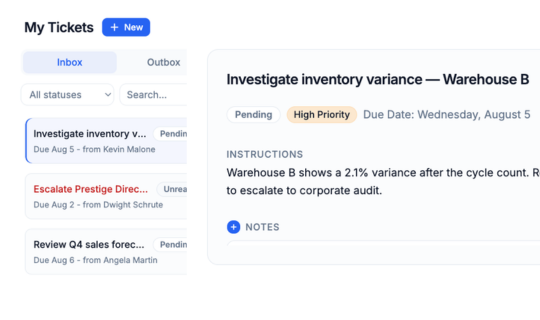
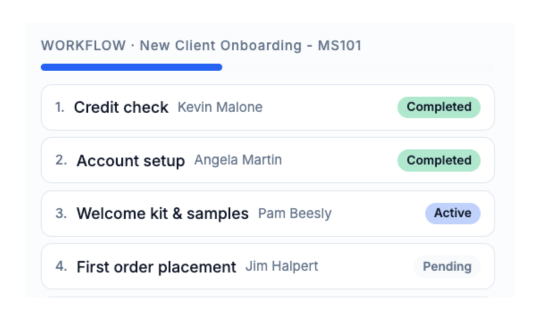
Until it is closed, approved, or blocked - with a note on every change. Multi-step processes route themselves, opening the next step the moment the last one closes.
Closed, blocked, approved, rejected - instant alerts with the reason attached. Status stops being something you have to go and ask for.
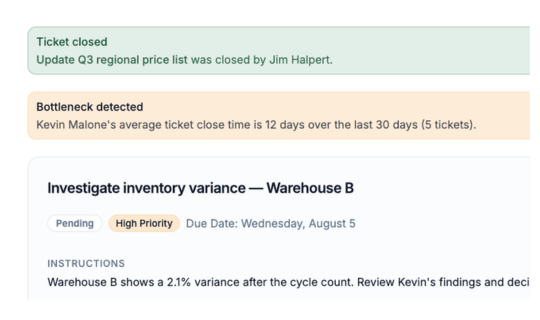
See what is late, what is blocked, and who is carrying too much - without asking a single person for a status update.
No implementation project. No consultant. No training videos.
About 30 seconds with a work email. No credit card, no sales call to sit through.
They sign in with Google or an email link. If they can use email, they are already trained.
Pick a person, a due date, and what you need. Under a minute, start to finish.
Every close, approval, rejection, and block needs a written reason before it will save. Nobody has to remember to document anything.
Six months later, when someone asks why a job was approved that Tuesday, the answer is already there - written by the person who made the call, on the day they made it.
When work stalls, the assignee picks a reason. The person who sent it finds out right then - not at the deadline.
A blocked ticket cannot be closed until unblocked.
If nobody opens a ticket for three days, ProcessPath raises it on its own. The work does not need a person remembering to follow up.
ProcessPath watches 30-day average close times and flags where work consistently slows down. You get a place to look, not a person to blame.
If you get an alert while you're not in the app, it can be emailed to you or held until you get back - your preference setting.
Nothing to install, nothing to migrate, nothing to rip out.
Google or an email link. Your company is matched by email domain, so new hires land in the right place automatically.
Add a routing code to incoming emails to have them arrive as trackable tickets with text and attachments intact.
Month-end close, quarterly audits, renewals. Put the workflow on a schedule and it opens on time whether or not anyone remembered.
Flat per company, not per seat. Adding a teammate never turns into a new purchase decision.
Plug in an agent or a system you already run. It can hand work to your people - or pick up tickets from its own Inbox and work them.
Connect Claude, ChatGPT, Gemini, or any MCP client. The agent then becomes another member of the team - able to create tickets for handoff, or pick up tickets to perform work.
Shows up just like another person in the system. Same tickets. Same paper trail.
Create tickets from other systems to handoff work.
For example, when a deal closes, an API call can automatically start a fulfillment workflow. Or when a tech closes a job in the field app, create a ticket for the office to send the invoice.
Teams that have outgrown sticky notes and bounced off the big platforms.
The solution to chat threads, group inboxes, and spreadsheet maintenance.
| Capability | ProcessPath | Big project platforms | Email & spreadsheets |
|---|---|---|---|
| Time to first ticket | Under a minute | After the rollout | Instant, then untracked |
| Training required | None | Sessions and documentation | None |
| Every task has one owner | Always | If configured | Whoever replies |
| AI agents & other systems | They get an Inbox, like anyone else | Plugins and custom work | Forward it to email |
| Recurring processes | Run on a schedule | Configurable | Someone's memory |
| Tells you when work stalls | Automatically | If configured | At the deadline |
| Written record of decisions | Required on every change | Optional | Buried in threads |
| Pricing | Flat, per company | Per seat, every month | Free, until something is missed |
"We were using WhatsApp but it was a complete mess: messages got lost, no real tracking, no history."
 Justin Robbins
"I own a small business with 4 employees, so there was no real need for a formal helpdesk system."
 Sonia Hernandez
"The main goal was something that people actually use without resistance."
 Chris Williams
I've worked in IT for over 30 years, supporting companies of all shapes and sizes. Across all those years, one pattern always stands out: the growing pains.
A business starts small, and at first, managing the workload is easy. You get by on email, chat threads, and a few spreadsheets. But as the volume of work and headcount grow, those methods get heavier and heavier to carry. Emails scroll away and are forgotten. Chat threads become vague and impossible to search. Spreadsheets technically work, but keeping them updated takes more effort with each passing day.
It all works - until suddenly it doesn't.
I've been in that hot seat. A client calls on a Friday afternoon and they're upset. Your stomach drops, and you spend the next hour frantically digging through inboxes and calling staff asking "what happened?" It's a terrible feeling. When you're a smaller outfit, your reputation is everything; you simply can't afford to let work drop through the cracks.
That's why I built ProcessPath. It was designed from the ground up around actual day-to-day operations. Tasks stay visible until they're finished, and every single task has one clear owner. Nothing can be deleted or magically vanish. And the system actively monitors the workflow, so if a task stalls or sits ignored, you get an alert.
There are plenty of task management tools out there. Most are bloated, overly complex, and total overkill for smaller teams. ProcessPath is my vision for how it should work: lightweight and straightforward on the surface, but deceptively powerful underneath.
I'm excited for you to try it out, and I would love to hear your feedback.

You're already paying for this
The morning spent finding out where things stood. The job that sat waiting on a vendor nobody chased. The step that got missed because the one person who knows the order was out.
None of it shows up as a line item, but you paid for all of it.
Flat rate for the whole company.
Not per seat.
Pick your plan later.
Upgrade, downgrade, or cancel anytime.

ProcessPath runs on Google Cloud in US regions only. The people who operate it are US-based. Ticket contents do not leave that boundary.
The app is hosted on Google Cloud in the United States. Customer data is not stored or processed outside the US.
Data is encrypted when it is stored and when it moves between your browser and our servers.
We do not sell customer data, and we do not share it with third parties for their own use.
We follow HIPAA, ISO 27001, and SOC frameworks on Google Cloud. That is not the same as a ProcessPath certification. See Google Cloud compliance for the underlying audits.
We may analyze how work moves (volume, age, stalls). The text, files, and notes on a ticket are never sent to an AI model.
Need a questionnaire, a BAA conversation, or a walkthrough of a control? Email privacy@processpath.io.
(Without rolling out another platform.)
Start your 14-day free trialNo credit card needed · 2 minute setup